Windows 11 · x64 and ARM64 · MIT

Set up Windows 11 your way. The old values stay on record.

WindowCraft installs apps, removes preinstalled packages, turns off telemetry and builds your own Windows ISO. It is a native program written in Rust, for people who set up their own computers. Before each change it saves the previous value, so you can roll it back later.

Version
1.4.0 ·
File
WindowCraft-1.4.0-x64-setup.exe · 7.2 MB
Other files
ARM64, MSI, portable, SHA256SUMS
Needs
Windows 11, build 22000 or later
License
MIT, free of charge
Signature
not code-signed, SmartScreen warns on the first run
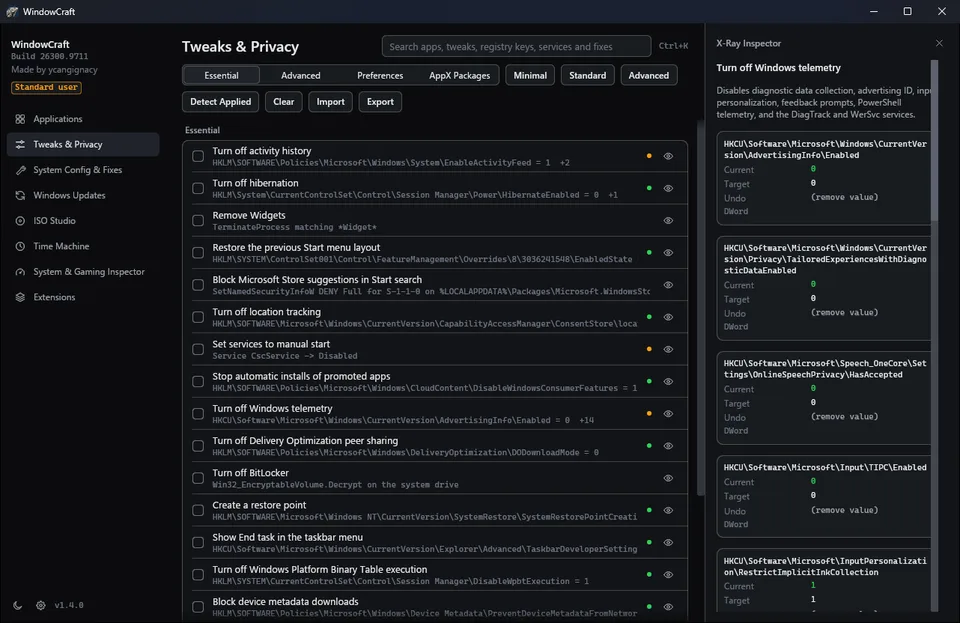
WindowCraft 1.4.0 on the Tweaks & Privacy page, with the X-Ray Inspector open on the tweak Turn off Windows telemetry
apps in the catalog
239
tweaks
68
removable AppX packages
34
interface languages
8

What it does

Nine pages in one window. These five do most of the work. Each label is the command that opens the page.

windowcraft.exe --open tweaks --inspect telemetry

Tweaks you can read before you run them

  • 68 tweaks
  • 34 AppX
  • 3 presets
  • Ctrl+K

Tweaks & Privacy has 68 tweaks and 34 removable AppX packages, with presets Minimal (6), Standard (13) and Advanced (21).

The X-Ray Inspector lists each registry value or service a tweak touches, with the current value, the target and the value a rollback writes back.

Ctrl + K searches apps, tweaks, registry keys, services, fixes and AppX packages.

One of the values behind Turn off Windows telemetry, as the Inspector lists it
Key
HKCU\Software\Microsoft\Windows\CurrentVersion\AdvertisingInfo\Enabled
Type
DWord
Current
what Windows holds now
Target
0
Undo
the value read before the change, or (remove value)
windowcraft.exe --open apps

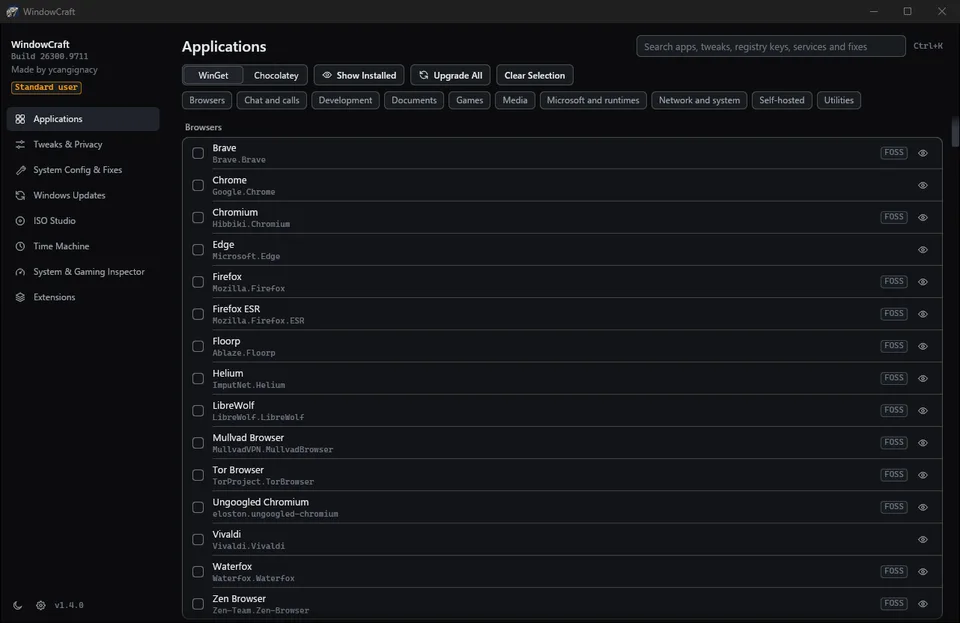
239 apps through WinGet or Chocolatey

  • WinGet
  • Chocolatey
  • 10 categories

Tick what you want, and WindowCraft installs, upgrades or removes it with the package manager you chose. Each row shows the package id, and FOSS marks open source software.

  • Browsers
  • Chat and calls
  • Development
  • Documents
  • Games
  • Media
  • Microsoft and runtimes
  • Network and system
  • Self-hosted
  • Utilities
The Applications page with the Browsers category and the WinGet source selected

windowcraft.exe --open timemachine

Every session can be rolled back

  • sessions
  • rollback
  • drift check

Each run becomes a session in Time Machine, with every change it made. Roll back the whole session or one change.

Removed packages, uninstalled apps and BitLocker decryption cannot be undone. WindowCraft asks before such a step.

Windows updates sometimes set a changed value back. A banner says so, and one click puts the values back. The automatic check in Settings, off by default, does the same on a schedule.

windowcraft-cli --check-drift --fix
  1. session Turn off Windows telemetry
  2. write HKCU\…\AdvertisingInfo\Enabled 1 → 0
  3. service DiagTrack Automatic → Disabled
  4. rollback writes back 1 and Automatic
Example of a session. The values depend on the computer.

windowcraft.exe --open iso

Your own Windows 11 installation media

  • answer file
  • drivers
  • USB GPT

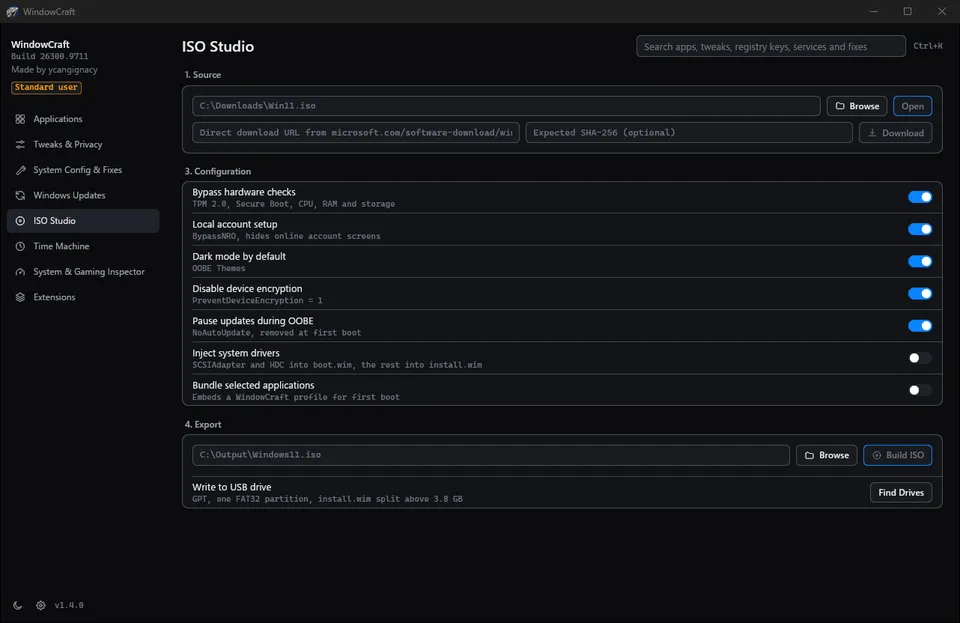
ISO Studio opens a Windows 11 ISO, or downloads one from a link on microsoft.com, and writes an answer file for it. The result is a new ISO or a USB drive.

ISO Studio with the configuration switches for hardware checks, local account, dark mode, device encryption and updates
  • Bypass hardware checksTPM 2.0, Secure Boot, CPU, RAM and storage
  • Local account setupBypassNRO, hides the online account screens
  • Disable device encryptionPreventDeviceEncryption = 1
  • Pause updates during OOBEremoved at first boot
  • Inject system driversSCSIAdapter and HDC into boot.wim, the rest into install.wim
  • Bundle selected applicationsa WindowCraft profile for the first boot

USB writing makes one FAT32 partition on GPT and splits install.wim above 3.8 GB. It checks the bus, the volumes and the disk again right before the first write. Answer files never configure disks.

windowcraft.exe --open extensions

Extensions, none installed by default

  • offline
  • SHA-256
  • opt-in

Everything runs on the computer and no file is uploaded. Downloaded tools come from their GitHub releases and are checked against the SHA-256 the release publishes.

ExtensionWhat it doesDownloads
Metadata stripperSaves a copy of a photo, audio or video file without location, camera data, dates and authornothing
File converterPictures, video and sound between 21 formats, without re-encoding video where the target allowsnothing
Additional formatsffmpeg, for AVIF, AVI, OGG, WMA, HEIC and video re-encodingabout 90 MB
YouTube downloaderOne video as MP4 or its sound as MP3, without an account or cookiesabout 150 MB

Command line

The installers put windowcraft-cli.exe next to windowcraft.exe. It waits and returns an exit code. Commands that change the system need an elevated terminal.

windowcraft-cli --preset standard --run
windowcraft-cli --config "C:\path\to\config.json" --run
windowcraft-cli --check-drift --fix
windowcraft-cli --export-report "C:\report.json"
windowcraft-cli --open tweaks --inspect telemetry

The other pages: System Config & Fixes, Windows Updates, System & Gaming Inspector and Settings.

From download to rollback

  1. Step 1 of 5: Download the installer

    setup.exe for a normal installation with a Start menu entry. The MSI is for Intune, GPO or msiexec /qn, and the portable file runs without installing.

  2. Step 2 of 5: Get past SmartScreen

    The builds are not code-signed, so Windows shows Windows protected your PC on the first run. Check the SHA-256 first, then choose More info and Run anyway.

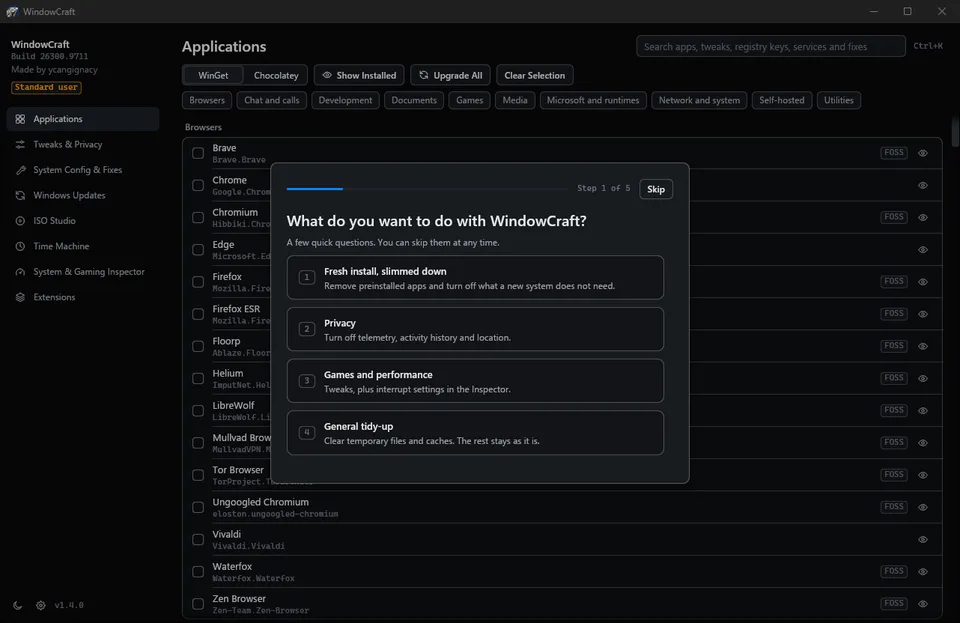
  3. Step 3 of 5: Answer four questions

    What you want to do, whether you keep your files, whether you build your own ISO and how much should change. Keys 1 to 4 pick an answer. Start ticks the matching preset and changes nothing yet.

  4. Step 4 of 5: Run as administrator

    WindowCraft starts as a standard user. The badge at the top of the sidebar restarts it as administrator, which most changes need. Every preset starts with a restore point.

  5. Step 5 of 5: Roll back what you do not want

    Time Machine lists the session with each change. Roll back all of it or one line.

The first question on the first start: what do you want to do with WindowCraft, with four numbered answers

What it does on your computer

The program

  • No background service, tray icon, update check or telemetry.
  • It connects only for an action you start: WinGet or Chocolatey packages, Windows ISO and tool downloads, extensions, the YouTube downloader and the DNS benchmark.
  • Its data lives in %LOCALAPPDATA%\WindowCraft. Uninstalling removes that folder for every user. Settings you changed in Windows stay.
  • RpcSs, DcomLaunch, LSM, BFE, mpssvc, WinDefend and ProfSvc can never be disabled, whatever a profile says.
  • Downloads that end up running are pinned to a SHA-256 hash or must pass Authenticode.

This site

No cookies, no analytics, no fonts or scripts from other servers. The download links go to GitHub.

Check the file

Run this in PowerShell in the folder with the download, and compare the result with the line for the same file in SHA256SUMS.txt from the release.

Get-FileHash .\WindowCraft-1.4.0-x64-setup.exe -Algorithm SHA256

SHA-256 of WindowCraft-1.4.0-x64-setup.exe as GitHub publishes it:4DAFAFF930DD0A9C238EB59A5E73A096CDF23D3385D0EB3BB7D7F08CC2423F33

SHA256SUMS.txt

Recent releases

  1. v1.4.0latest

    The catalog now follows the interface language. This release also closes the rest of the 1.3.0 audit: a lock on the downloaded tools, a stronger disk check before ISO Studio erases a USB drive, and the removal of code nothing used.

    Release notes
  2. v1.3.1

    This release fixes what a full audit of 1.3.0 found across the engine, ISO Studio, the interface, profile handling and the eight interface languages. No new pages or extensions were added.

    Release notes
  3. v1.3.0

    This release adds an introduction on the first start and a short tip on each page. The catalogs, the installers and the extensions work as in 1.2.1.

    Release notes
  4. v1.2.1

    This release fixes what a full test of 1.2.0 found. Nothing new was added, and the catalogs, the installers and the extensions work as in 1.2.0.

    Release notes

Full changelog

Questions

Windows says it protected my PC. Is the file safe to run?

The builds are not code-signed, so SmartScreen warns about them as about any new file from an unknown publisher. Compare the SHA-256 of the file with SHA256SUMS.txt from the release, then choose More info and Run anyway. The source code and the release workflow that builds the files are public on GitHub.

Does it run on Windows 10?

The installers check for Windows 11, build 22000 or later, and stop on older systems.

How do I update it?

WindowCraft does not check for updates. Download the new setup.exe or MSI from the releases page and run it. An upgrade keeps your data and the Time Machine history.

Can every change be undone?

Tweaks, services and settings roll back from Time Machine. Removed AppX packages, uninstalled apps and BitLocker decryption cannot be undone, and WindowCraft asks before those steps. Create a restore point before you apply changes; every preset starts with one.

How do I uninstall it, and what stays behind?

Uninstall it from Installed apps. That removes %LOCALAPPDATA%\WindowCraft for every user, Time Machine history included, so roll changes back first if you want them undone. For the portable build, run windowcraft.exe --purge-data from an elevated terminal and delete the file. Settings you changed in Windows stay.

What does it cost?

Nothing. WindowCraft is under the MIT License.

Which languages does it speak?

English, Polish, German, French, Spanish, Italian, Brazilian Portuguese and Ukrainian. It starts in the Windows display language when it is one of these, and Settings changes it at once.

Where do I report a bug?

Open an issue on GitHub with the WindowCraft version, the Windows build and the steps that led to it. Report a security problem privately through the GitHub advisory form, not in a public issue.

Support

Write to the address below or open an issue on GitHub. Security problems go through the private advisory form.